
개발 과정에서 작업의 맥락을 꼼꼼히 담은 커밋 메시지와 Pull Request(PR)를 남기는 것이, 훗날 유지보수를 위해 얼마나 중요한지는 우리 모두 잘 알고 있습니다.
하지만 막상 개발에 몰입하다 보면 변경 사항은 걷잡을 수 없이 쌓이기 마련이고, 뒤늦게 이를 논리적인 단위로 쪼개어 커밋하는 일은 여간 번거로운 게 아닙니다. 정성스럽게 PR을 작성하는 것 또한 상당한 에너지가 드는 일이죠.
그래서 저는 이 반복적이고 소모적인 과정을 LLM을 활용해 자동화해보려 합니다.
📌 custom slash command
claude code 에는 custom slash command 라는 기능이 있습니다.
https://code.claude.com/docs/en/slash-commands#custom-slash-commands
Slash commands - Claude Code Docs
Control Claude's behavior during an interactive session with slash commands.
code.claude.com
.claude/commands 디렉토리 아래에 우리가 사용할 명령어들의 설정을 정의해주기만 하면 됩니다.
이번 포스트에서는 작업 내용을 분석해 적절한 커밋 메시지를 생성하는 /commit 명령어와, 현재 브랜치의 변경 사항을 종합해 Pull Request 초안을 작성해주는 /pull-request 명령어를 추가해보겠습니다.
📌 git commit 명령어
commit 의 형식과 유의사항등을 작업 지침으로 전달합니다.
---
allowed-tools: Bash(git add:*), Bash(git status:*), Bash(git commit:*)
description: Create a git commit
---

## Context

- Current git status: !`git status`
- Current git diff (staged and unstaged changes): !`git diff HEAD`
- Current branch: !`git branch --show-current`
- Recent commits: !`git log --oneline --decorate`

## Your task

Analyze the changes in the working directory and create appropriate git commits.

**Important:**

1. Review all changed files (both staged and unstaged)
2. Group related changes together logically
3. If there are multiple unrelated changes, create separate commits for each logical group
4. Use only staged changes for commit
5. Avoid mixing unrelated changes in the same commit
6. Commit short summary and body must be in Korean (scope must be in English because it would be package name or directory name)
7. Do not co-author commits (Claude)

**Steps:**

- First, analyze the git status and diff to understand all changes
- Identify logical groups of related changes
- For each group:
  - Create a commit with an appropriate message
- If changes are simple and related, a single commit is fine

Once you have staged the necessary changes for a commit group, create the commit.
Use the following format for the commit message:

```
(<scope>): <emoji type> <short summary>
<BLANK LINE>
<body (optional)>
<BLANK LINE>
```

emoji type can be one of the following:

- ✨ : add/fix feature
- ✏️ : comments or typo fix
- ♻️ : refactor
- 🎨 : add/change UI layout or CSS
- 🍱 : add/change static files
- 💬 : apply code review
- 📝 : documentation
- 🚀 : release commit
- 📦 : npm package update (package.json)
- ⚡️ : improve performance
- 🐛 : fix bug
- 💅 : fix lint, prettier error
- 🔥 : hot fix
- 🧹 : remove unnecessary code or files
- 👷 : add/change ci/cd workflow
- ⚙️ : add/change project config file (eslintrc, prettierrc etc.)
- 🦋 : commit changeset file
- 🚧 : work in progress, but commit for split large scale jobs
- 🔁 : fix rebase conflict issue
👀 사용 예시

📌 pull request 명령어
동일한 방식으로 pull request 를 생성하는 명령어도 추가할 수 있습니다.
pull request 를 생성하려면 GitHub 에 접근이 가능해야하는데, GitHub MCP 를 사용하지 않고 gh CLI 로 단순하게 처리하는 방식을 사용하겠습니다.
사용하려면 최초 인증 과정이 필요합니다.
https://cli.github.com/manual/gh_pr_create
GitHub CLI
Take GitHub to the command line
cli.github.com
생성할 pull request template md 파일을 생성해놓고, pull request description 작성 시에 이를 참고하도록 지시합니다.
---
allowed-tools: Bash(git *), Bash(gh *), Bash(brew install gh)
description: Create a pull request
---

## Context

- Current git status: !`git status`
- Current branch: !`git branch --show-current`
- Recent commits on current branch: !`git log main..HEAD --oneline`
- Recent commit diffs on current branch: !`git log main..HEAD -p`

## Your task

Create a pull request for the current branch against the main branch on GitHub.

**Important:**

1. Ensure all changes are committed before creating the pull request
2. Use a clear and descriptive title for the pull request
3. Write a detailed description of the changes made in the pull request
4. Use Korean for the title and description. But `<scope>` in the title must be in English because it would be package name or directory name

**Steps:**

- First, ensure all prerequisites are met:
  - If there are uncommitted changes, reject this task and ask user to commit first
  - If the branch doesn't have an upstream configured, push the branch to the remote repository first
- Second, check all of the current branch commit ids ahead to target branch.
- Third, gather information about the changes made in the current branch
- Then, use the GitHub CLI to create a pull request with an appropriate title and description
  - Use `gh` commands to create the pull request
  - If `gh` is not installed, install it using `brew install gh`
  - Use the `Pull Request Template Format` section below for the pull request title and description
  - Create the pull request against the `main` branch
    - Use `gh pr create --base main --title "<title>" --body "<description>"`
- Finally, provide the URL of the created pull request

**Pull Request Template Format:**

- Title: `(<scope>): <short summary>`
- Body: Use the format from `.github/PULL_REQUEST_TEMPLATE.md` file in the repository. Fill in the description section with a summary of changes, issues fixed, motivation, context, and any dependencies.
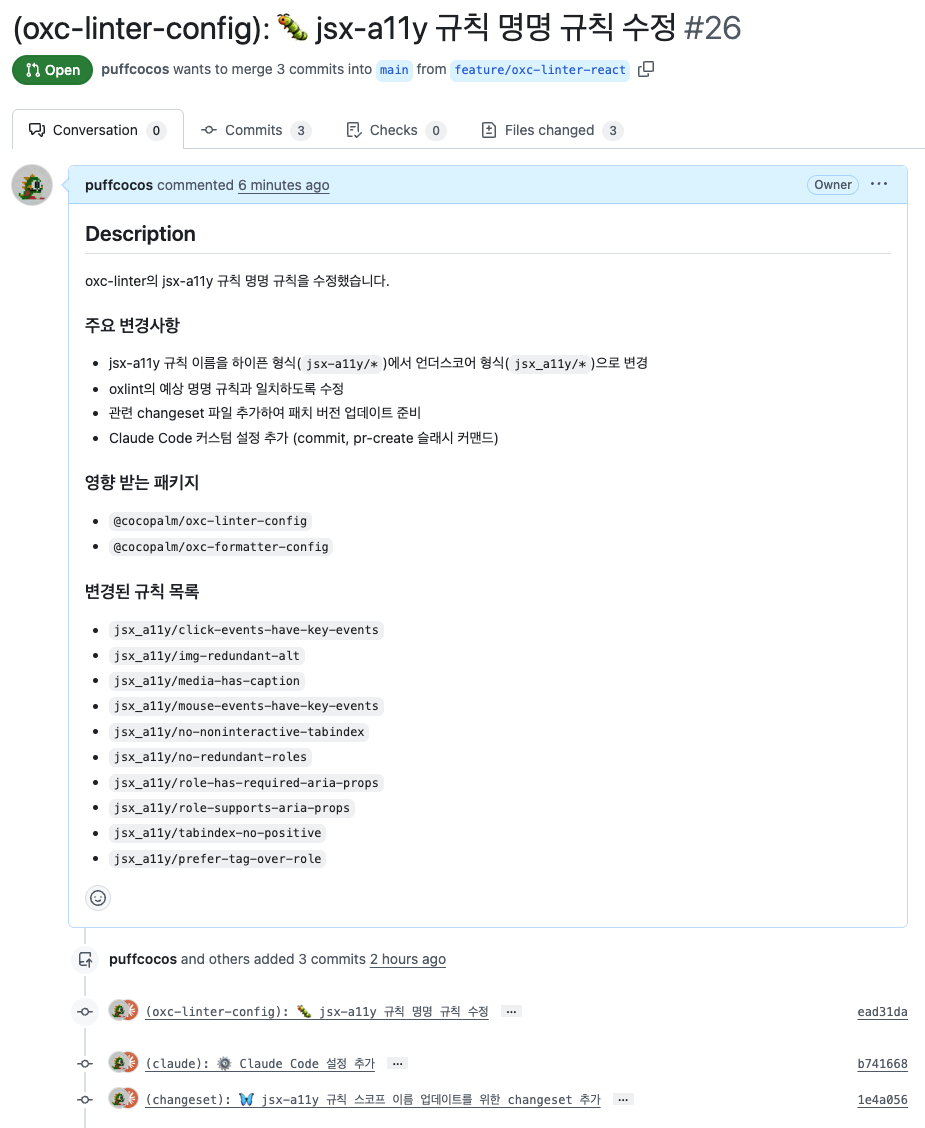
👀 사용 예시

'👨💻 web.dev > ops' 카테고리의 다른 글
| RSS 구독 요약 LLM Slack Bot 만들기 (0) | 2025.10.11 |
|---|---|
| GitHub Actions 를 활용한 release bot 만들기 (0) | 2023.04.24 |
| SVN 을 이용한 형상관리 PART.2 - SVN 브랜치 전략 세우기 (1) | 2022.03.01 |
| SVN 을 이용한 형상관리 PART.1 - SVN 이란? (0) | 2022.03.01 |


💬 댓글